
Innerclock Systems SYNC-GEN 3LX and MULTI-SPLIT
This article describes my experience using the Innerclock Systems Sync-Gen 3 clocking solution. I also dig into the differences between DIN SYNC and MIDI, as well as details specific to my own environment. The components of the solution include:
My Environment
- Windows 10 PC with Cubase 13 Pro
- 828es MOTU Interface
- Five12 Vector Sequencer
- ISLA S2400 Sampler
- ALM Pam's Pro Workout
- Retrokits RK008 Realtime Multitrack Midi Recorder
- Groove Synthesis 3rd Wave Polyphonic Synthesizer
- 2x right angle midi cables to link the 3LX and Multi-Split
Innerclock solution
- Sync-Gen 3 plugin (AU, AAX, VST2, VST3)
- Sync-Gen 3LX
- Multi-Split
- DIN to CLOCK/RUN “Y Box” (prototype)
- Y split cable (dual TS ¼ inch female to TRS ¼ inch male TRS)
- 2x Meanwell power supplies (external to devices)

Note - images of the products have been taken from the Innerclock website with David's permission. The terms TX and RX refer to TRANSMIT and RECEIVE. Sync-Gen 3LX will be referred to in full and also as “3LX”. The Y Box has not been formally released by Innerclock Systems - more details below.
Innerclock Systems- who are they?
Innerclock Systems is a music technology business run out of Dee Why in New South Wales, Australia. David Lackey is the main man, and founded the business in 2001. Prior to that he spent 15 years working at Roland as head of tech support and product manager for pro audio, and various other pro audio placements before that. He tells me he has been music tech focused since the age of 13, and that wasn’t recently.
Notable users of Innerclock Systems include the The Chemical Brothers, The Prodigy, Orbital, Disclosure, Maluma and Hot Chip, Martin Gore of Depeche Mode. I guess if it is good enough for me, it is good enough for them. David sent me the gear to test, but has had no say or input to the content I present here, other than vetting some technical descriptions to ensure accuracy.
Solving a Problem - Inaccurate Clocking in your DAW and Instrument setup
I am what some people refer to as obsessed with the clocking of electronic instruments when they need to work together to create synchronised musical parts. If you have taken the step to record electronic music into your Desktop Audio Workstation (DAW) then you may have seen in wave form images, or even heard in audio, that not all electronic instruments clock equally, and not all DAWs and computer setups send clock reliably.
Whether this is a big deal for you or not is all about personal preference. Personally, I prefer rock solid timing that allows me to step away from the grid if desired. Many artists have produced great works with little or no thought of the concepts I have outlined above. But for me, accurate clocking is imperative in electronic music and it was just as important when I was playing in bands with human clocks.
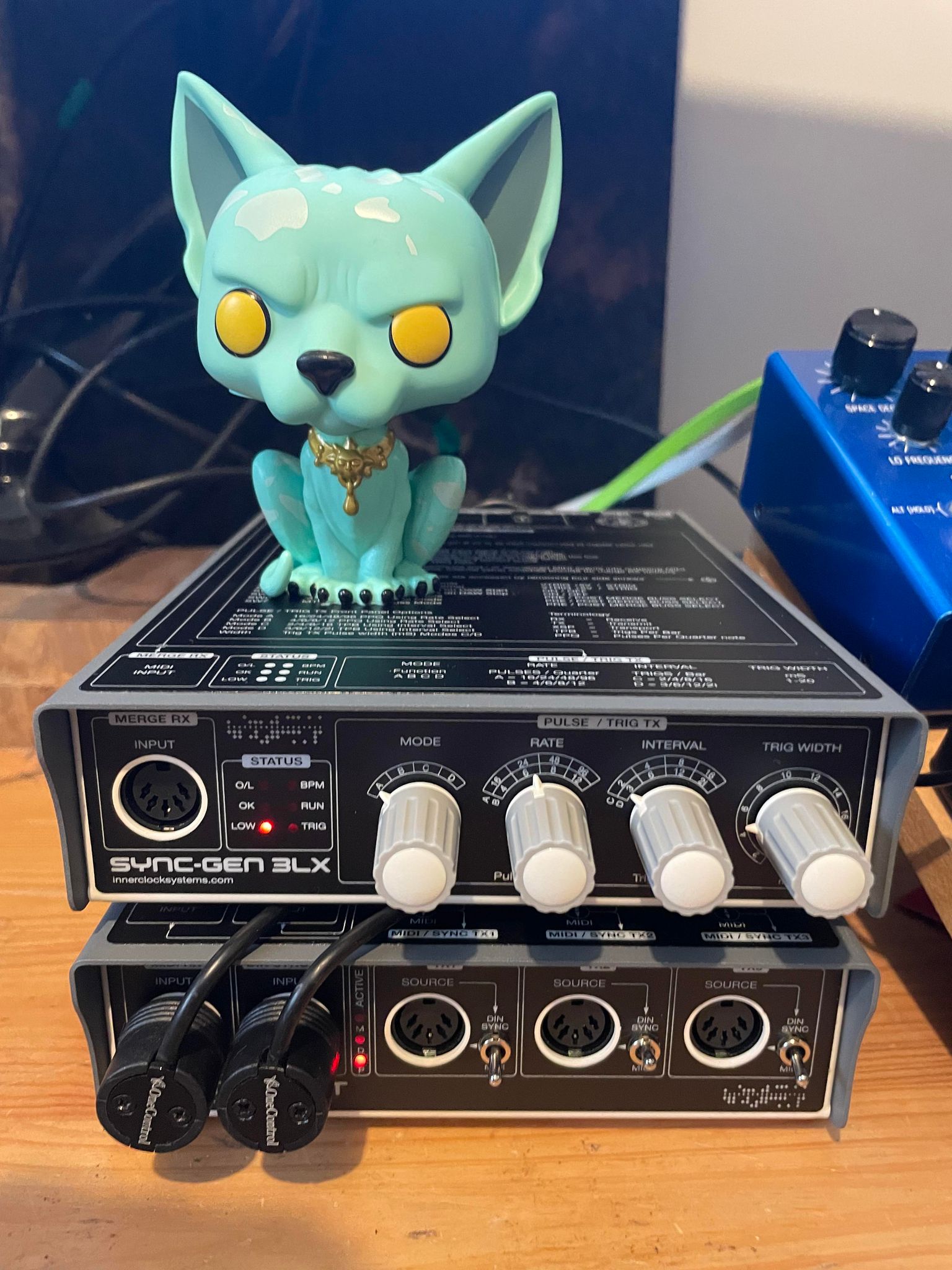
Lying Cat can not abide false MIDI clocking… And he has been silent.
The Innerclock Systems Solution
Sync-Gen 3 Plugin - loads into your DAW as a AU, VST2, VST3 or AAX plugin. The plugin sits on a stereo audio channel and sends clocking signal to the Sync-Gen 3LX box when your DAW transport is running. You will need an ILOK account to run the plugin, but this is easily setup and free to do so.
Connectivity is simple. You take two outputs from your audio interface (they don't need to be decoupled) and connect them to a supplied Y connector and then into a TRS input on the back of the 3LX. David tells me it is also possible to run via a single TS cable to save outputs, but I have not yet tested this.

SYNC-GEN 3 Plugin. You can see the OFFSET I have dialed into my system is 185
Sync-Gen 3LX - the master clocking unit which receives clock signal from the Sync-Gen 3 plugin. It provides a midi input/merge connector on the front, as well as easy access to hardware configuration knobs. Note that all TX outputs on the 3LX and Multi-Split can be switched between DIN SYNC and MIDI signaling. There are more details below regarding what this means.

Sync-Gen 3LX Front
From the rear two TX (transmit) MIDI DIN outputs are cabled to the Multi-Split expander. These supply MIDI and DIN signal in parallel, avoiding conversion between the two which would add latency. There is also a TIP/RING TRS output and a third MIDI TX output to connect to midi enabled instruments.

Sync-Gen 3LX Rear
Multi-Split - the clocking slave unit which receives clock from the 3LX. Connectivity from the 3LX is to two MIDI DIN inputs on the front of the Multi-Split. I would recommend 2x right angle midi connectors for neat patching. I use the OneControl brand but there are others. The Multi-Split front panel also provides three MIDI TX outputs.

Multi-Split Front - connects to the 3LX and provides three MIDI TX outputs
The rear provides four more for a total of 7 MIDI TX outputs on the Multi-Split. If that isn't enough you can bring another Multi-Split into the mix for an additional 7 outputs…

Multi-Split Rear - four more MIDI TX outputs.
The “Y Box” Prototype takes MIDI DIN signal and converts it to Eurorack ready RUN and CLOCK signal. Innerclock will be releasing a finished product in the near future. Excuse the breadcrumbs...

Recap - in Simple Terms
Clocking from DAW to 3LX
- DAW runs the Sync-Gen 3 Plugin on a stereo out audio channel
- The stereo out channel routes through a pair of Motu interface outputs
- Two ¼ inch cables connect to a Y connector cable (dual female TS to single male TRS)
- The TRS jack connects to the 3LX rear mounted SG3 IN
Forwarding Clocking to the Multi-Split
- The 3LX connects to the Multi-Split via two rear mounted MIDI TX outputs
- The Multi-Split is receives clocking from the 3LX via two front mounted MIDI RX inputs
Forwarding Clocking to my Vector Sequencer (Eurorack)
- The 3LX connects to a Y box via a rear mounted MIDI TX output
- The Y Box takes the DIN clocking and converts it to two TS outputs
- Dual TS cables connect to the RUN and CLOCK inputs of my Five12 Vector Eurorack sequencer
Pressing Play in my DAW
When I hit PLAY in Cubase with the plugin loaded):
- The Sync-Gen 3 plugin will wait until a bar line is reached
- The plugin will generate clocking at the BPM of the DAW project
- Clock signal is routed from the plugin to the associated stereo output of my audio interface
- Clock signal is received by the 3LX and forwarded to the Multi-Split and also the Y box
- the Y box forwards Clock and Run signal to my Eurorack sequencer
- All connected instruments and devices will begin to play in time with clock

The Knowledge…
Unboxing and Setup
The packaging and presentation of the 3LX and Multi-Split is as expected of a premium product. An easy to use routing cheat sheet is included, as well as a couple of globes which can be inserted to 5 pin inputs to test signal. Yes, they light up so you can see what is happening…
The devices themselves have some weight and feel solid. All 5 pin connectors, switches and knobs feel like they are built for long term use. The only thing I would have liked is a dual device mount to hold them both together as one unit. The Meanwell power supplies are well specified and should not give you any problems.
Setup was easy. It took me about 15 minutes to unbox and setup, install the plugin and connect to my Isla 2400, Five12 Vector and 3rd Wave synthesiser. I will connect to the rest of my gear once I solve a few cable routing issues in my studio space.

MIDI or DIN SYNC?
All of the 5 PIN TX and RX (transmit and receive) connectors on the 3LX and Multi-Split may be switched between MIDI and DIN protocols. What does this even mean?
DIN SYNC and MIDI Physical Connection
Physically we use the same type of connector (5 PIN) for DIN SYNC and MIDI. There are differences to how they are wired being:
DIN SYNC - uses all 5 pins. 1 is a ground line, 2 through 5 are Start/Stop, Reset, Clock and Fill in Pulse. DIN SYNC is pure voltage with no requirement for computational processes or associated latency. This means there is no 960 microsecond lag added to each event (as with MIDI) and the clocking information is not competing with other data.
MIDI - (Musical Instrument Digital Interface) uses only 3 pins being 2, 3 and 4. MIDI is digital and each midi message requires nearly 1 millisecond (960 microseconds) to be received by the slave device. Lag over midi increases when note information, polyphonic chords, CC data is included, and clocking information is not prioritised over any other signaling, and only one event at a time can be sent at at time. David explains this in greater detail here.
Some MIDI cables only have 3 wires connected between the 5 point ends. Be careful when purchasing a MIDI cable for DIN SYNC purposes. In my experience (and also David’s recommendation) the HOSA cables work just fine for both protocols.
What about TRS MIDI?
TRS provides three signaling connections being Tip, Ring and Sleeve. The original MIDI spec requires three connections but specified use of the 5 PIN DIN SYNC style hardware. TRS provides the correct physical connection quantity but is not part of the MIDI spec.
TRS MIDI works just fine, but it must be kept in mind there are two types (A and B) which have different configuration. Type A sends SYNC via the TIP, and type B uses RING for SYNC and the TIP is SOURCE. My Five12 Vector uses type B but other devices use Type A. You can get some nifty converters from Retrokits.
Clocking and Synchronisation
DIN SYNC is a protocol that creates 24 pulses per quarter note (ppqn) to ensure accurate synchronisation between devices connected by a 5 pin DIN SYNC cable. DIN SYNC may also be referred to as Sync24. There are other higher rates of pulses per quarter note including Sync48 and Sync96. However, the most used standard is 24 ppqn and this is the rate used in DIN SYNC clock synchronisation.
DIN SYNC was a creation of Roland in the 1980s. David at Innerclock also spent 15 years at Roland, so it may be assumed knows the protocol extremely well. It is worth noting that the 3LX runs at 96 ppqn internally and offers equal or lower ppqn rates to connected devices. Though DIN SYNC uses a 5 pin cable similar to MIDI, it's sole purpose is to transmit and receive clocking information.
DIN SYNC has had a bit of a resurgence since the 80s due to Eurorack sequencers and clocking devices offering DIN SYNC as an option due to it being a tighter clock signal than MIDI. For example, my Five12 Vector sequencer hosts both MIDI and DIN SYNC connectors on the expander module, and also RC24 Clock and Run inputs and TRS Type B on the main module.
MIDI carries clocking information and a whole lot more. MIDI is fantastic for sending note pitch, length and CC information but it comes at the expense of a less reliable clock. Jitter is introduced, and thus clocking via MIDI can create time vortexes which will swallow a Romulan Warbird faster than you can say “logic clearly dictates that the needs of the many outweigh the needs of the few”... or, it might just make your kick drum flam when you don't want it to do that. I know which one I prefer… See you later Warbird.
So in summary… all you really need to know is whether your 5 pin connected device wants to be sent MIDI or DIN signal. When setting up your 3LX and Multi-Split you simply switch the lever for the TX output to match and off you go. If you are using a Y box to split 5 pin to Clock and Run then you must select DIN on the TX output.
All of the 5 PIN TX outputs are phase locked, meaning that they all perform based on the same settings you have input to the 3LX plugin.
24 or 48?
If you are going to run TX 3 from the rear of the 3LX to an RC24 device you will need to take special care with the switch labelled 24 or 48 on the back of the unit. Setting at 24 will be correct in most instances, 48 being reserved for older Korg devices. If you switch to 48 and your device needs 24, then the received clock by the slave device will be twice as fast as intended.

The 3LX and Multi-Split come with very easy to follow instructions. I was up and running in less than 20 minutes.
In Use
Five12 Vector - DIN SYNC via Clock and Run inputs (24ppqn)
The Five12 Vector Sequencer is the heard and brain of my hardware setup, so getting clocking right using the SYNC-GEN3 was essential. Without this working as expected the Sync-Gen 3LX solution would have been irrelevant to me as a musician.
- I connected the 3LX TX3 output to the prototype Y Box.
- The Y Box splits 5 pin DIN signal to dual TS Clock and Run outputs.
- I set the TX3 output as DIN and the 24/48 setting to be 24 ppqn.
- I took the dual TS Clock and Run cables and connected the Y Box to the Vector Clock and Run inputs.
- Loading the Sync-Gen 3 plugin I massaged the offset value to be plus 185.
- The Five12 Vector clocks beautifully on my Cubase grid.

Five 12 Vector Sequencer and Pam's Pro Workout with multed Clock and Run signal from the Y Box
Isla S2400 - MIDI Input
I chose to use the Isla Instruments S2400 for testing because it has extremely tight clocking to both MIDI and RC24 inputs. A lot of care has been taken by Isla to get this right.
- I connected my Isla S2400 sampler to the rear output (TX4) of the Multi-Split device.
- I set the switch to MIDI, and configured the S2400 to run from a MIDI DIN clock input.
- The same offset setting as used for the Vector sequencer (185) worked very well for the S2400.
- S2400 performance was excellent measured against my Cubase grid.
One thing you MUST keep in mind when testing clocking using a sampler, is that your sample itself may have some dead time before the actual sound begins. If that is the case, then your clocking will always look late. So, make sure your samples are cleanly trimmed and use appropriate fast attack sounds when testing.

Isla Instruments S2400 Sampler with MIDI clock input from the Multi-Split
Pam's Pro Workout - DIN SYNC via Clock and Run multed from same cables as Vector
Pam's Pro (and New) Workout modules are standards in Eurorack environments, so I was super keen to test it with the SYNC-GEN3 solution.
- Initially this module performed in an odd way using the same DIN SYNC signal sent to the Vector.
- Pro Workout was spitting out signal substantially ahead of the bar line - to the point of it being unusable.
- I went to the ALM website and updated the Pro Workout firmware to version 127.
- The firmware update increased performance greatly and resolved the issue.
- Clocking of the Pro Workout is now on the grid (almost dead on measured against the Vector and Isla).
Retrokits RK008 Realtime Multitrack Midi Recorder
The RK008 is a super cool small format MIDI event recorder with a tonne of features. I like using it with my polysynths because it is easy to record performance data, play it back to the synth, and interact with knobs and faders to control the sound in real time. You can even record those knob and fader events back into the RK008 with the right setup.
- Multi-Split TX3 (front facing) Output in MIDI mode
- Input to Midi Input 1 of the RK008
- RK008 Output 1 to the MIDI INPUT of my 3rd Wave Polyphonic Synthesizer
- 3rd Wave MIDI OUT to MIDI Input 2 of the RK008
- This configuration allows me to (1) record MIDI events from the 3rd Wave to the RK008, (2) send MIDI events from the RK008 to the 3rd Wave, and (3) receive clock and transport start events from the Sync-Gen 3LX
- I was able to successfully play monophonic and chord parts from the 3rd Wave to the RK008 and have them play back as expected
- Clocking from the 3LX to the RK008 was achieved easily and felt very much in time with the other instruments

Retrokits RK008 Realtime Multitrack MIDI recorder using MIDI output from the Multi-Split
Clocking using MIDI is always going to involve MIDI overheads and lack of prioritisation from the sequencer to the synthesizer. However, to my ear the playback of parts from the RK008 to the 3rd Wave were very much in time with the rest of my jam. This is NOT a scientific statement but an aesthetic judgement.
Offset
Configuring Offset enables you to shift clock output (by sample quantity) plus or minus a specified value. The outputs of the 3LX and Multi-Split are all phase locked, which means that they all send the clock with the same offset value.
In my environment, plus 185 is she magic number to get the Vector and Isla S2400 bang on the grid. The Pam’s Pro is also very close to the point of being indiscernibly different. The rule I apply is to get clocking locked in prioritising your percussion and fast attack sound and sequence generators
Why do different pieces of hardware require different values? That is a complex question and comes down to the hardware used as well as the firmware programming - as proven by the vastly different performance of the Pro Workout once I upgraded to firmware version 127.
Conclusion
Pros
- The only clocking system more accurate might be the right hand of Robert Fripp.
- Easy to setup and the plugin UI is very easy to follow.
- Expandable with multiple Multi-Splits per 3LX.
- Well made, premium quality hardware with excellent support from David at Innerclock Solutions.
- Satisfied my testing in multiple scenarios, and with all hardware working in parallel in sync.
Cons
- All outputs are phase locked, but in practice this has not been an issue using mixed hardware.
- Nothing else. Nothing.